PayPal / USDT / Solana Crypto Guide 10.21.25

This would require an exchange that supports USDT transactions on both Tron (as TRC-20 tokens) and Solana (as SPL tokens)

Some multi-coin crypto wallets can interface with a lightweight exchange (Changelly, etc) so you can swap crypto at whatever market rates are at the time. Some have additional support for purchasing crypto, especially in smaller amounts (under $500).

If I were to take a guess as to how to exchange your tokens -- Tron is legal in China. It also isn't widely used outside of China. Binance was a big supporter of Justin Sun (Tron's founder) from the very beginning. If the Binance wallet is legal or grey for US Citizens, that may be a good place to start.
ooh, thank you! That gives me something useful to google, and puts me that much closer to returning to spending too much, too often on peptides.
 
So I bought sol using this walk through when I go to send it I get their address and just click send and follow prompts? Sorry totally newbie and just don’t want to mess this up
 
Thank you for this information. This is my first time doing anything with crypto. When I go into my PayPal, it gives me the option to buy various crypto currencies, including Bitcoin (BTC). It also gives me the ability to send Bitcoin. Is this all I would need to do?? or are there additional steps required? I'm trying to figure out how Exodus Wallet would figure into this Paypal scenario and if Exodus Wallet is needed. TIA
 
Back in the day (a little over a year ago), people were spending $10-$30+ to buy crypto to pay for their peptides. In my infinite cheapness, I sought a different, i.e. cheaper way to do it.

That's when I discovered that you can use PayPal to buy crypto, specifically USDT/USDC on Solana, for no fee. However, since putting this together, PayPal has instituted a 1.5% fee when buying through Exodus Wallet. It's a minimal fee and not bad if you value the convenience.

This crypto purchase method allows you to purchase stable coins, which are pegged to the US Dollar, and convert to other stable coins on the Solana chain, which completely avoids market volatility. You can't profit with these coins, but you can't really lose value either.

You may have seen a version of this elsewhere, but this in the most updated version.

Please let me know if you have any questions! I've been answering them for over a year so I'm sure I've heard it before and probably have an answer
Even with your very detailed instructions, the crypto stuff is still going over my head. I might need to watch a few youtube videos.
 
I’m stuck on page 18 now because PYUSD isn’t showing up for me for some reason.
 
I’m stuck on page 18 now because PYUSD isn’t showing up for me for some reason.
I figured out I needed to add it to the list of available options. I don’t know when it changed but the minimum buy is now $50 instead of $5
 
Hit a few bumps along the way, but they were easy workarounds. Found my way by following the guide. If you start the process w/out being PayPal crypto verified, once you get to the part to "Buy PYUSD" (also if it doesn't show in the drop down, you need to add it to your options - it didn't appear for me initially, so I had to go manually select it), you can log into your PayPal account from there it will walk you through the steps to get you confirmed (photo id, your face scan). After that I just purchased it in PayPal and then sent it to my PYUSD wallet (copy/paste address from Exodus). I did a test run with the $5, there wasn't a transaction fee, but there was a network fee for me of $0.27... not sure why, maybe due to the small amount.

Thank you so much for this! It's been years since I've done anything with crypto and SO much has changed, like whoa! Couldn't have done this without your guide ⭐️⭐️⭐️⭐️⭐️
 
I figured out I needed to add it to the list of available options. I don’t know when it changed but the minimum buy is now $50 instead of $5
Never mind, it was just my inexperience. Got it figured out out. Thank you for this very much
 
Please explain:
"Jupiter.ag."
"Stripe"
&"On ramp"
I have indeed loaded Exodus Wallet
 
This guide was put together well. Thank you for taking the time to make this.

Took me a bit to get the 1st transaction done for a trial run, but it worked great.
 
Back in the day (a little over a year ago), people were spending $10-$30+ to buy crypto to pay for their peptides. In my infinite cheapness, I sought a different, i.e. cheaper way to do it.

That's when I discovered that you can use PayPal to buy crypto, specifically USDT/USDC on Solana, for no fee. However, since putting this together, PayPal has instituted a 1.5% fee when buying through Exodus Wallet. It's a minimal fee and not bad if you value the convenience.

This crypto purchase method allows you to purchase stable coins, which are pegged to the US Dollar, and convert to other stable coins on the Solana chain, which completely avoids market volatility. You can't profit with these coins, but you can't really lose value either.

You may have seen a version of this elsewhere, but this in the most updated version.

Please let me know if you have any questions! I've been answering them for over a year so I'm sure I've heard it before and probably have an answer!

Is there a trick to opening attachments in this forum? I open this and all I get is a blank screen. It happened with another link I tried to open as well.
 
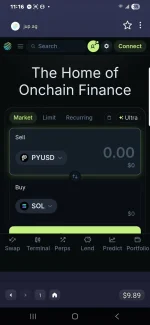
Thanks for the guide. I made to up to page 26 before I hit an issue. I can't see the same options you do and my balance shows as zero on the Juniper page. I see a green connect that I don't see on your photo. Did I miss a step? Thanks for your patience, it's like a foreign language to me.
 

Attachments

  • f0b92503-70b2-426a-94ff-033c584cf27c.webp
    f0b92503-70b2-426a-94ff-033c584cf27c.webp
    53.5 KB · Views: 21
Thanks for this tutorial. All is going well for me until page 26. There is no big "Swap" button. Instead, there is a big "Connect" button. After entering the amount I want to swap, when clicking on Connect I get a page that seems to want me to download Jupiter Mobile app. What do I do now? Thanks!
 
Just had a crazy experience with PYUSD(been using it a ton more than BC), I went to pay a vendor and Exodus kept saying vendor's wallet address wasn't valid. I asked vendor if their PYUSD was possibly on a different network, just a guess as I had no idea if it could be.

They said it said it was on Ether, did some quick research and saw that it might be on Solana, figured out how to swap it over. I didn't want to buy any more bitcoin so that motivated me. Finally success after an hour of my time wasted. Did I say I hate dealing with crypto?
 
Anybody having trouble verifying identity? It keeps asking me to enable camera and I did I been trying to do this for hours now crypto is so annoying dude
 
Thanks for this tutorial. All is going well for me until page 26. There is no big "Swap" button. Instead, there is a big "Connect" button. After entering the amount I want to swap, when clicking on Connect I get a page that seems to want me to download Jupiter Mobile app. What do I do now? Thanks!
I finally figured out that with crypto, nothing seems to happen fast - lol. The "swap" button finally showed up.
 
Back in the day (a little over a year ago), people were spending $10-$30+ to buy crypto to pay for their peptides. In my infinite cheapness, I sought a different, i.e. cheaper way to do it.

That's when I discovered that you can use PayPal to buy crypto, specifically USDT/USDC on Solana, for no fee. However, since putting this together, PayPal has instituted a 1.5% fee when buying through Exodus Wallet. It's a minimal fee and not bad if you value the convenience.

This crypto purchase method allows you to purchase stable coins, which are pegged to the US Dollar, and convert to other stable coins on the Solana chain, which completely avoids market volatility. You can't profit with these coins, but you can't really lose value either.

You may have seen a version of this elsewhere, but this in the most updated version.

Please let me know if you have any questions! I've been answering them for over a year so I'm sure I've heard it before and probably have an answer!
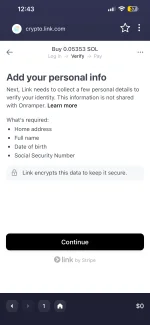
new user trying to use this method after i go through the process to buy the $5 of sol with apple pay before it asks for my information including name address and social sec number , does that sound right and is it safe to enter that
 

Attachments

  • IMG_6808.webp
    IMG_6808.webp
    66.5 KB · Views: 16
What were you doing with your PP account that set them off?
Well, you COULD say I wasn’t sending funds to my family or friends overseas! Are you a FDA AI bot? Frozen means “inability to conduct any business with PayPal.” Please don’t probe my paranoia; my goose is cooked.
 
What worked for me is to Coinbase to buy USDT on Ethereum network, transfer it to my Exodus wallet and from there make the payment.
I always keep five to $10 worth of Ethereum on my exodus wallet to cover the miscellaneous transaction fee
 
I have made a couple of purchases using these instructions with Exodus wallet successfully. Using Paypal to buy crypto and send it to vendors but today Paypal locked me out when Exodus tried to make the purchase, had me call and then couldn't resolve a "security issue" with my account. Told me to wait 48 hours and try again. That doesn't work for me.

Can someone please walk me through how to use Coinbase? Can I just add money to Coinbase and transfer it to Exodus to pay using USDT Solana. So confused.

Thanks!
 
Here is a great explanation of how to do business using Coinbase>Exodus>Ven dor:

file:///C:/Users/scott/Downloads/Telegram%20Desktop/USDC-Exodus.pdf

Simple enough. Read through it a couple of times until you're comfortable with it.
 
Here is a great explanation of how to do business using Coinbase>Exodus>Ven dor:

file:///C:/Users/scott/Downloads/Telegram%20Desktop/USDC-Exodus.pdf

Simple enough. Read through it a couple of times until you're comfortable with it.
Link doesn't work because it's local. I would love to see that document if you can post it. Thanks.
 
Guide: How to Buy and Pay with USDC (Solana Network)

What is this about?
• This guide shows you how to easily buy the stablecoin USDC, store it in your own
wallet, and use it for payments.
• ���� Made for beginners who want a fast, low-cost payment method without price
fluctuations.

Your Setup
• �� Coin: USDC
• � Network: Solana (SOL)
• ����� Exchange: Coinbase
• ������ Wallet: Exodus

Why this combination?
• �������� USDC = stablecoin
o BTC & ETH fluctuate → inconvenient for payments.
o USDC = stable, easy to buy with euros or dollars, and stays at $1.00.
• ��������� Solana as the network
o Lightning Fast: Transactions confirm in seconds.
o Ultra Cheap: Fees are typically less than $0.01 (compared to dollars on
Ethereum).
o Coins are network-bound: Make sure you use USDC-Solana.
• ����� Coinbase as exchange
o �� High liquidity and easy on-ramps for fiat currency.
o ��� Very simple interface for first-time buyers.

Key Terms
• �������� Stablecoin: A coin pegged to the USD.
• � USDC: A regulated stablecoin, backed 1:1 by dollar reserves.
• ��� Exchange: The marketplace (Coinbase) where you buy crypto with euros or US
dollars.
• ��� Wallet: Your own digital safe (Exodus) that you control completely.
• ��������� Solana: The high-speed blockchain that USDC is moving on.
• ���� Transaction Fee: The tiny fee paid to the network, paid in SOL.

Step-by-Step Guide
������ Step 1: Set up your Exodus Wallet
1. Download Exodus (iOS/Android).
2. Open the app → your wallet is created automatically.
3. ������ Write down your 12-word recovery phrase and store it safely offline.
��� Without the recovery phrase, your money is gone. Never share it with anyone.

Step 2: Deposit money to Coinbase
1. Create a Coinbase account and verify your ID.
2. Deposit euros (via iDEAL/SEPA) or US dollars (via Debit/ACH/Wire). Funds usually
arrive in minutes or a few business days depending on the method. (EDIT: Coinbase
has been HORRIBLE about holds lately, so once you deposit your cash you may
need to wait a few days before proceeding past the next step.)

Step 3: Buy USDC
1. Tap Buy crypto and choose USDC.
2. Enter the amount of euros or dollars you want to spend -> Review Order.
3. Tap Buy now. Your USDC will appear under My assets.

Step 4: Send USDC to Exodus
1. Open Exodus → Tap USDC → Tap Receive.
2. Crucial: Ensure the network selected is Solana. Copy your address (it will be a long
string of random letters and numbers).
3. In Coinbase → Tap Send crypto:
o Paste your Exodus address.
o Select USDC as the asset.
o Select Solana as the network (Always double-check this!).
o Check the gas fee.
o Tap Send now.
4. Your USDC will arrive in Exodus almost instantly.

Step 5: Buy SOL (for transaction fees)
• To send USDC out of your Exodus wallet later, you need a tiny bit of SOL to pay the
network fee.
• Buy a small amount of SOL (even $2–$5 is enough for hundreds of transactions) on
Coinbase and send it to your Exodus Solana address.

�� Done! Bob’s your Uncle!
You now have USDC + a little SOL in your own self-custody wallet—ready for safe, instant,
and independent payments.
 

Trending Topics

Forum Statistics

Threads
17,776
Posts
184,737
Members
59,703
Newest
Egrande1
Back
Top Bottom