NIIMBOT team here — would love to hear how you label

rikiwang

GLP-1 Novice
🚫No Source Discussion🚫
Member Since
Mar 13, 2026
Posts
26
Likes Received
42
Location
china
Hi everyone — I'm with the NIIMBOT team. Some of you helped us with an earlier round of vial-labeling research, and the feedback genuinely shaped what we're building. We're now opening a second round and would love to hear from more of you.


It's quick and low-effort — just a few short questions about how you actually organize and label, whichever way is easiest for you.


A few things we're working on that we'd really value your thoughts on:


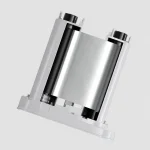
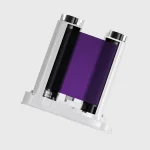
  • More ribbon colors — purple, silver, and holographic
  • New in-app tools to make label setup faster
  • Accessory kits to make labeling vials easier

If you'd be open to sharing your perspective, just reply here and I'll follow up. Thanks so much — we read everything.


— Riki, NIIMBOT Market Research
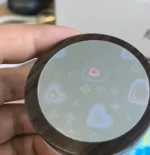
 
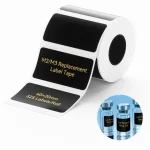
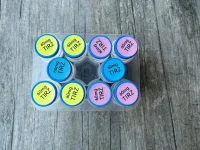
A quick look at some of the new things we've been working on 👇


  • New label materials — more options and finishes for vial labeling
  • New ribbon colors — purple and silver, plus a few more on the way
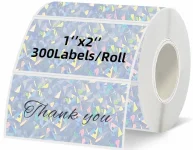
  • New holographic / laser labels — eye-catching finishes that still stay readable on small vials
  • New in-app tools — a redesigned setup flow plus a handy calculator to speed up label creation
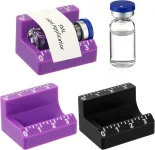
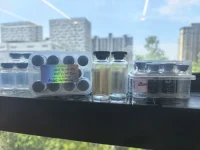
  • Accessory kits — small add-ons to make labeling vials quicker and cleaner

I'll drop some photos below 📷 — would love to hear which of these you'd actually use, and what else you'd want to see. Reply here anytime!


— Riki, NIIMBOT Market Research1781487432209.webp1781487469489.webp1781487524307.webp1781487571399.webp1781487644414.webp
 
Hi everyone — I'm with the NIIMBOT team. Some of you helped us with an earlier round of vial-labeling research, and the feedback genuinely shaped what we're building. We're now opening a second round and would love to hear from more of you.


It's quick and low-effort — just a few short questions about how you actually organize and label, whichever way is easiest for you.


A few things we're working on that we'd really value your thoughts on:


  • More ribbon colors — purple, silver, and holographic
  • New in-app tools to make label setup faster
  • Accessory kits to make labeling vials easier

If you'd be open to sharing your perspective, just reply here and I'll follow up. Thanks so much — we read everything.


— Riki, NIIMBOT Market Research
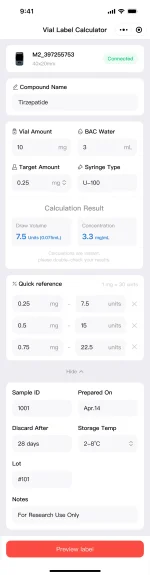
BRILLIANT coming right to the heart of the label users! Good luck with your market research!
 
A quick few things we'd love your input on 👇

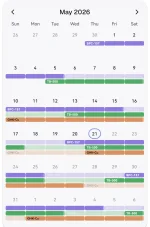
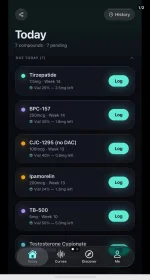
We're building these as mini-programs right inside the NIIMBOT app — focused on health management, and some of them link directly to your label printing.

How do you keep track of your vials right now — a spreadsheet, a template, or just memory? If the app could manage that for you, what would you want it to keep?

Do you track dates — reconstitution, expiry, thaw? How do you handle that today, and would automatic reminders help? (This is one we can tie straight to the label you print.)

Curious how others manage this — reply below anytime, happy to chat more from there.1781488560982.webp1781488609013.webp
 
A quick look at some of the new things we've been working on 👇


  • New label materials — more options and finishes for vial labeling
  • New ribbon colors — purple and silver, plus a few more on the way
  • New holographic / laser labels — eye-catching finishes that still stay readable on small vials
  • New in-app tools — a redesigned setup flow plus a handy calculator to speed up label creation
  • Accessory kits — small add-ons to make labeling vials quicker and cleaner

I'll drop some photos below 📷 — would love to hear which of these you'd actually use, and what else you'd want to see. Reply here anytime!


— Riki, NIIMBOT Market ResearchView attachment 27477View attachment 27478View attachment 27479View attachment 27480View attachment 27481
The Vial Label Calculator is a brilliant idea, I can't wait to use it. It's the feature I didn't know I was missing.
 
More than more ribbon colors, being able to do multiple.colors without wasting labels on your proprietary label rolls.

Id like a higher dpi than we currently get.
Honestly anyone doing anything for any kind of selling labeled vials needs an ink jet cause quality is to low.

Labeling accessories currently suck.
I have the exact purple ones you posted a picture of. They suck pretty hard but better than nothing.

Holographic labels are cool tho
 
the nimblot program would be a lot better if we’re able to use vector files. Importing files into the app gives not the best or ideal resolution.
 
More than more ribbon colors, being able to do multiple.colors without wasting labels on your proprietary label rolls.

Id like a higher dpi than we currently get.
Honestly anyone doing anything for any kind of selling labeled vials needs an ink jet cause quality is to low.

Labeling accessories currently suck.
I have the exact purple ones you posted a picture of. They suck pretty hard but better than nothing.

Holographic labels are cool tho


Thanks so much for this — really honest and useful feedback 🙏

you're right that our current ribbons only do single or dual color, so we're working to add more multi-color and design-style options — for both vial caps and vial bodies for M2&M3. We've also noticed users are willing to "waste" a third or even half a roll just to get multi-color, so we're trying to solve that at the label-material level itself rather than making you burn labels for it.

On holographic: beyond the standard silver, we're adding diamond and heart laser finishes too.

And one thing you might not know — our independent site supports fully custom labels, so you can DIY your own designs/layouts exactly how you want them.

On DPI: worth mentioning that all our thermal-transfer machines, including the M2 and M3, are 300 dpi. We've tested small text on a 40×20mm label on a 3ml vial and it still comes out clear and readable — so you may get more quality out of them than you'd expect.

Would you be open to a quick chat about your setup? Happy to thank you for your time with a new machine, VIP access, or label-supply coupons — whatever's most useful to you.


1781490776774.webp1781490815484.webp1781490869278.webp1781491049394.webp
 
the nimblot program would be a lot better if we’re able to use vector files. Importing files into the app gives not the best or ideal resolution.
Good point !

Just to make sure we build the right thing: which vector format would you most want to import — SVG, AI, EPS? And are you mainly importing logos/icons, or full label layouts?

Happy to dig in further if you're open to it — this is exactly the kind of feedback that's useful. 🙏
 
A quick few things we'd love your input on 👇

We're building these as mini-programs right inside the NIIMBOT app — focused on health management, and some of them link directly to your label printing.

How do you keep track of your vials right now — a spreadsheet, a template, or just memory? If the app could manage that for you, what would you want it to keep?

Do you track dates — reconstitution, expiry, thaw? How do you handle that today, and would automatic reminders help? (This is one we can tie straight to the label you print.)

Curious how others manage this — reply below anytime, happy to chat more from there.View attachment 27482View attachment 27483
Boy howdy I know some folks who could/would use this. Right now I use a medication app that shows me the dosage with a reminder. But I know others who stru6tp remember each dosage and having it in an app with the labels would be ideal.
 
Good point !

Just to make sure we build the right thing: which vector format would you most want to import — SVG, AI, EPS? And are you mainly importing logos/icons, or full label layouts?

Happy to dig in further if you're open to it — this is exactly the kind of feedback that's useful. 🙏
If you could allow any of those file types that would boost the app more importantly the printer it self. I use affinity, adobe , and Coreldraw. I’ve figured out some settings that the niimbot likes when I import my designs into the app. Yet, it’s still not laser sharp even though it’s a vector file in my editing software. If that would be fixed we would have to deal with contrast settings /printer density.
 
Boy howdy I know some folks who could/would use this. Right now I use a medication app that shows me the dosage with a reminder. But I know others who stru6tp remember each dosage and having it in an app with the labels would be ideal.
😄 Really appreciate you sharing this.

is it the amount per shot, the timing/schedule, or which vial is which that trips them up most?

if you printed a label right when you open or mix a vial, and that same label flowed into a dosage log with reminders, would that actually fit how you work? Or would it get in the way?

Thanks again, this is super helpful 🙏
 
If you could allow any of those file types that would boost the app more importantly the printer it self. I use affinity, adobe , and Coreldraw. I’ve figured out some settings that the niimbot likes when I import my designs into the app. Yet, it’s still not laser sharp even though it’s a vector file in my editing software. If that would be fixed we would have to deal with contrast settings /printer density.
This is valuable— thank you 🙏
So if I'm hearing you right: even when you import a clean vector from Affinity/Adobe/Corel, the output still isn't laser-sharp — which means the issue is less about the file type and more about how the app handles it on the way to the printer (the rasterizing step and/or print density/contrast). Is that fair? that's exactly the kind of thing that's easy to miss without a power user like you spelling it out. We will handle this.
 
Thanks so much for this — really honest and useful feedback 🙏

you're right that our current ribbons only do single or dual color, so we're working to add more multi-color and design-style options — for both vial caps and vial bodies for M2&M3. We've also noticed users are willing to "waste" a third or even half a roll just to get multi-color, so we're trying to solve that at the label-material level itself rather than making you burn labels for it.

On holographic: beyond the standard silver, we're adding diamond and heart laser finishes too.

And one thing you might not know — our independent site supports fully custom labels, so you can DIY your own designs/layouts exactly how you want them.

On DPI: worth mentioning that all our thermal-transfer machines, including the M2 and M3, are 300 dpi. We've tested small text on a 40×20mm label on a 3ml vial and it still comes out clear and readable — so you may get more quality out of them than you'd expect.

Would you be open to a quick chat about your setup? Happy to thank you for your time with a new machine, VIP access, or label-supply coupons — whatever's most useful to you.


View attachment 27485View attachment 27486View attachment 27487View attachment 27488
Absolutely i'd chat with you more! I love the idea of more than two colors, or even just not "wasting" labels to make a bicolor label!

I LOVE the diamond and heart holographic idea and would definitely purchase those for my M2!

I do know about creating custom labels, ai labels ect and have little issue with the creative side. Its not canva but its a nice little proprietary label designer 🙂

But the dpi really sticks out. The ink jet labels look farrrrrr sharper than the 300dpi could possibly achieve. Most of the serious pep vendors use inkjet because they look so darn professional and its a standard niimbot cant quite gey close to. Smaller time folks like me are satisfied with my M2, but would i prefer.... 600dpi? In all honesty yes i would! That doesnt take away from loving the ease of use and simplicity of the niimbot!

And I would love the vip access for a bit to really put the niimbot software through its paces!!!!

Thank you for your time, and I LOVE my Niimbot d10, D11 and M2, suggest them to everyone here and other forums all the time!
 
Absolutely i'd chat with you more! I love the idea of more than two colors, or even just not "wasting" labels to make a bicolor label!

I LOVE the diamond and heart holographic idea and would definitely purchase those for my M2!

I do know about creating custom labels, ai labels ect and have little issue with the creative side. Its not canva but its a nice little proprietary label designer 🙂

But the dpi really sticks out. The ink jet labels look farrrrrr sharper than the 300dpi could possibly achieve. Most of the serious pep vendors use inkjet because they look so darn professional and its a standard niimbot cant quite gey close to. Smaller time folks like me are satisfied with my M2, but would i prefer.... 600dpi? In all honesty yes i would! That doesnt take away from loving the ease of use and simplicity of the niimbot!

And I would love the vip access for a bit to really put the niimbot software through its paces!!!!

Thank you for your time, and I LOVE my Niimbot d10, D11 and M2, suggest them to everyone here and other forums all the time!
Thank you again, honestly 🙏 On the resolution point: it's not something we can solve on the current machines in the short term.
I'd also love to follow up with you a bit more, and I'm having a little trouble reaching you through the usual way here — not sure if it's a settings thing on either end. If you're open to it, feel free to reach out to me and we can pick it up from there.
And one curiosity while I have you — when you picked up the D series, was it mainly for the small round labels, or more as an easy entry-level machine to try things out? Just helps me understand how folks land across the D10, D11, and M2.
Thanks again — means a lot. 🙏

1781502726987.webp
 
Hello, I have NIIMBOT M3 and I absolutely love the different label options available. More ribbon colors would get my attention. I do notice on the freeze temp labels, the text appears to be a little faded? Is that expected or do I need to change something? I have only had my NIIMBOT for 2 months.

Also curious to know if an iPad version of the app is in the works? I prefer to do design labels on my iPad, I am also unable to use the NIIMBOT software on my Mac because it’s not compatible with the M3. So for now I have to use my phone.

Overall I am enjoying the product.

Thanks for reaching out on this forum, I really appreciate it.
 
Hello, I have NIIMBOT M3 and I absolutely love the different label options available. More ribbon colors would get my attention. I do notice on the freeze temp labels, the text appears to be a little faded? Is that expected or do I need to change something? I have only had my NIIMBOT for 2 months.

Also curious to know if an iPad version of the app is in the works? I prefer to do design labels on my iPad, I am also unable to use the NIIMBOT software on my Mac because it’s not compatible with the M3. So for now I have to use my phone.

Overall I am enjoying the product.

Thanks for reaching out on this forum, I really appreciate it.
Thanks so much, Kique — really glad you're enjoying the M3! 🙏 And more ribbon colors are definitely coming: we're working to bring purple, silver, and even laser/holographic ribbons online, plus a richer range of two-color options.
1781506688488.webp1781507032426.webp
On the faded text on freeze-temp labels — quick question so I can help properly: are you printing onto our cold-storage label material, and what temperature are you storing at? Our common thermal-transfer labels hold up well down to around -20 to -30°C.for ultra-cold storage like dry-ice / -80°C chains you'd need a different material spec

If you can share a photo, I'd be happy to pin down the exact fix.
Good news on the software side too:
  • Mac compatibility for the M3 is already in the works — we expect it around August.
  • On an iPad version — this is really helpful to hear. Could you tell me a bit more about how you'd use it? Mainly designing labels on the bigger screen, or printing directly from the iPad too? The more detail, the better we can build it.
Really appreciate you taking the time — overall feedback like this is exactly what helps. 🙌
 
iPad user here.
I'd love to have the Niimbot app on there.
Both the bigger screen as well as the option to print (from third party apps) would be great.
The ability to use the Apple Pen in the app to make custom drawings would be awesome too.
 
iPad user here.
I'd love to have the Niimbot app on there.
Both the bigger screen as well as the option to print (from third party apps) would be great.
The ability to use the Apple Pen in the app to make custom drawings would be awesome too.
Love this, DrPEPr — thank you 🙏
We've actually heard very similar requests before from our journaling / planner users and feedback like yours helps push it up the list. We'll work to make it happen as soon as we can.
Really appreciate you taking the time to spell it out. 😉
 
I am looking for a label machine and this one has a lot of good reviews. Do you sell it in Sweden?
 
I would love to help with this!
I am all about the more color ribbons, purple and hot pink 🥰
I too use an iPad with the standard ios app, it's working fine for me but I would love to see one designed for the iPad and pencil.
The multi color labels and calculator shown are great, they would absolutely come in handy.
I agree it would be nice to not waste labels to get a multi color. Appreciate the effort you are taking to make more options for vial labeling, so many of us purchased the m2 for exactly that.
 
Hi everyone — I'm with the NIIMBOT team. Some of you helped us with an earlier round of vial-labeling research, and the feedback genuinely shaped what we're building. We're now opening a second round and would love to hear from more of you.


It's quick and low-effort — just a few short questions about how you actually organize and label, whichever way is easiest for you.


A few things we're working on that we'd really value your thoughts on:


  • More ribbon colors — purple, silver, and holographic
  • New in-app tools to make label setup faster
  • Accessory kits to make labeling vials easier

If you'd be open to sharing your perspective, just reply here and I'll follow up. Thanks so much — we read everything.


— Riki, NIIMBOT Market Research
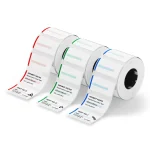
Hi guys

a way for multicolor in the app with layering
its bad that i need to print 100 label with only black ribbon
then rewind the label do the same 100 label with the red color
then rewind the label do the same 100 label with green color
then rewind the label do the same 100 label with blue color BUT NOW THE RFID SAY ALL THE LABEL HAVE BEED USED and cant do blue and i scrapped a brand new roll

i only printed the same 100 label 3 time but the RFID say 300 print and the roll is dead ...

you need to add a way in the app to rewind the label for multicolor print and not change the rfid number

that my only issue

because to circumvent that i was buying roll from ali express and switch the rfid tag and return them to you guys

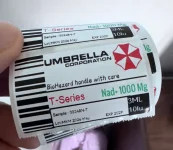
here is a exemple of the label i do
1781530080990.webp
 
As a side note, "BioHarzard handle with care" in that comic sans-inspired font is cracking me the fuck up. 🤣

Can't say I was expecting that amount of whimsy for a serious disclaimer.
 
Hi guys

a way for multicolor in the app with layering
its bad that i need to print 100 label with only black ribbon
then rewind the label do the same 100 label with the red color
then rewind the label do the same 100 label with green color
then rewind the label do the same 100 label with blue color BUT NOW THE RFID SAY ALL THE LABEL HAVE BEED USED and cant do blue and i scrapped a brand new roll

i only printed the same 100 label 3 time but the RFID say 300 print and the roll is dead ...

you need to add a way in the app to rewind the label for multicolor print and not change the rfid number

that my only issue

because to circumvent that i was buying roll from ali express and switch the rfid tag and return them to you guys

here is a exemple of the label i do
View attachment 27532
Those labels are SO GORGEOUS!!
 

Trending Topics

Forum Statistics

Threads
17,934
Posts
186,634
Members
60,179
Newest
Bucky7676
Back
Top Bottom