U.S. Residents Can’t Get To The Site

So what is the “cure” to regain access with a computer, please? I’ve tried safari, duck and brave-no worky. And please explain it so an old computer dumbass can UNDERSTAND HOW. None of this smug, oh SO superior, 10 year old whiz kid ‘splainin’! 😠🤓
I wonder if my phone and ‘puter are using two different wireless access methods…
‘Puter might be on starlink or vice versa…
Ah...frickin' starlink. Fixed it. Thank you for 'esplainin' how to gain access again. 🤣 🤣 🤣
 
Last edited:
So what is the “cure” to regain access with a computer, please? I’ve tried safari, duck and brave-no worky. And please explain it so an old computer dumbass can UNDERSTAND HOW. None of this smug, oh SO superior, 10 year old whiz kid ‘splainin’! 😠🤓
I wonder if my phone and ‘puter are using two different wireless access methods…
‘Puter might be on starlink or vice versa…
Ah...frickin' starlink. Fixed it. Thank you for 'esplainin' how to gain access again. 🤣 🤣 🤣
Folks were reporting yesterday that it was a starlink issue, but some reported that it was a VPN issue.

Are you using a mac or pc? If mac, make sure that Apple's Private Relay is turned off. You can find that in your iCould settings?

Are you using a VPN? If so, turn it off and see what happens.

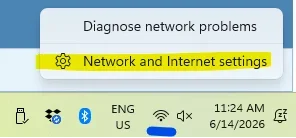
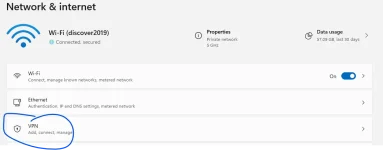
On a Windows computer: click the network icon in the bottom-right corner of the screen (near the clock), and if a VPN is connected it'll show up there with a "Disconnect" button. You can also go to Settings, then Network & Internet Settings, then VPN.

1781450741172.webp

Check here:

1781450771535.webp

If you've installed an independent VPN, it will likely show in the bottom panel near the clock.

You might also temporarily stop your virus protection as there could be a VPN associated with that.
 

Trending Topics

Forum Statistics

Threads
17,878
Posts
186,056
Members
59,990
Newest
AlphaTrader
Back
Top Bottom