walkingdreadd
GLP-1 Novice
🚫No Source Discussion🚫

Hi guys! I would like everyone to learn from my mistakes if you can. I initially mad some mistakes with a few different wallet accounts. Started on Base then switched to Metamask. The problem I had, and I have seen a few people doing the same thing, is not understanding how to buy and trade on specific networks. I thought I'd make a quick start guide for those that might need help.
1. Install metamask as an in browser extension on your PC browser or app on your phone.
2. Connect your debit card or bank account
3. Purchase the correct crypto on the correct NETWORK. Most vendors I have delt with used Solana network and I prefer USDC as the crypto.
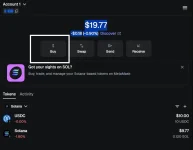
Select the correct network by clicking the dropdown yours may not be Solana:
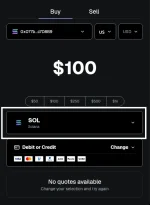
Search for your coin type and select the correct network:
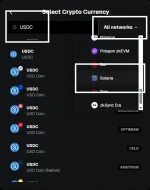
You will see you are now purchasing USDC on SOL
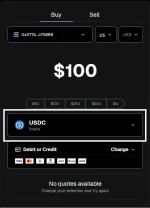
Complete that purchase but if you try to transfer at this point you will get an insufficient funds error even if the money is there (Please not it took up to an hour for my funds to show up on my first transfer and my bank was debited immediately. I freaked out a little.)
Now lets buy our gas which varies per network I did $10 initially but you only need like 5 cents.
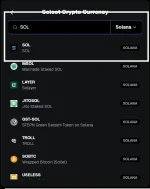
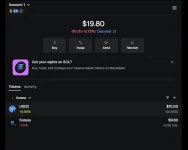
Complete that purchase the same as above and your Metamask screen will look the same as my first screenshot. You can now scan the QR code or enter the wallet ID by clicking send -> clicking USDC on Solana (or whatever you are using to pay) and entering the payment address.
This should complete your purchase.
Notes:
Base network and Ethereum network use the same wallet ID. If you are using Base you can scan or enter an Etherium wallet ID and the money will be sent. If your seller does not accept Base or does not have a Base wallet your money is most likely gone. I would stay away from Base if you can.
Good idea to send a small amount and confirm receipt before sending the total.
Make sure you are on the correct Network for your purchase. Again most I have used use Solana or Ethereum.
Please let me know if there are any mistakes or if something isnt clear. My account was already setup so i could not screenshot the beginning, but it is pretty straightforward.
1. Install metamask as an in browser extension on your PC browser or app on your phone.
2. Connect your debit card or bank account
3. Purchase the correct crypto on the correct NETWORK. Most vendors I have delt with used Solana network and I prefer USDC as the crypto.
Select the correct network by clicking the dropdown yours may not be Solana:
Search for your coin type and select the correct network:
You will see you are now purchasing USDC on SOL
Complete that purchase but if you try to transfer at this point you will get an insufficient funds error even if the money is there (Please not it took up to an hour for my funds to show up on my first transfer and my bank was debited immediately. I freaked out a little.)
Now lets buy our gas which varies per network I did $10 initially but you only need like 5 cents.
Complete that purchase the same as above and your Metamask screen will look the same as my first screenshot. You can now scan the QR code or enter the wallet ID by clicking send -> clicking USDC on Solana (or whatever you are using to pay) and entering the payment address.
This should complete your purchase.
Notes:
Base network and Ethereum network use the same wallet ID. If you are using Base you can scan or enter an Etherium wallet ID and the money will be sent. If your seller does not accept Base or does not have a Base wallet your money is most likely gone. I would stay away from Base if you can.
Good idea to send a small amount and confirm receipt before sending the total.
Make sure you are on the correct Network for your purchase. Again most I have used use Solana or Ethereum.
Please let me know if there are any mistakes or if something isnt clear. My account was already setup so i could not screenshot the beginning, but it is pretty straightforward.