U.S. Residents Can’t Get To The Site

So what is the “cure” to regain access with a computer, please? I’ve tried safari, duck and brave-no worky. And please explain it so an old computer dumbass can UNDERSTAND HOW. None of this smug, oh SO superior, 10 year old whiz kid ‘splainin’! 😠🤓
I wonder if my phone and ‘puter are using two different wireless access methods…
‘Puter might be on starlink or vice versa…
Ah...frickin' starlink. Fixed it. Thank you for 'esplainin' how to gain access again. 🤣 🤣 🤣
 
Last edited:
So what is the “cure” to regain access with a computer, please? I’ve tried safari, duck and brave-no worky. And please explain it so an old computer dumbass can UNDERSTAND HOW. None of this smug, oh SO superior, 10 year old whiz kid ‘splainin’! 😠🤓
I wonder if my phone and ‘puter are using two different wireless access methods…
‘Puter might be on starlink or vice versa…
Ah...frickin' starlink. Fixed it. Thank you for 'esplainin' how to gain access again. 🤣 🤣 🤣
Folks were reporting yesterday that it was a starlink issue, but some reported that it was a VPN issue.

Are you using a mac or pc? If mac, make sure that Apple's Private Relay is turned off. You can find that in your iCould settings.

Are you using a VPN? If so, turn it off and see what happens.

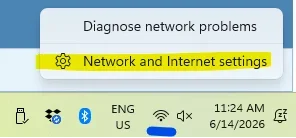
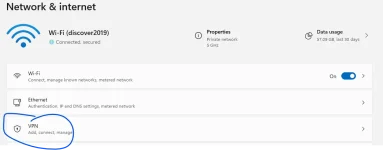
On a Windows computer: click the network icon in the bottom-right corner of the screen (near the clock), and if a VPN is connected it'll show up there with a "Disconnect" button. You can also go to Settings, then Network & Internet Settings, then VPN.

1781450741172.webp

Check here:

1781450771535.webp

If you've installed an independent VPN, it will likely show in the bottom panel near the clock.

You might also temporarily stop your virus protection as there could be a VPN associated with that.
 
Last edited:
Absolutely not insulting anyone, but I am chuckling over all of us smart enough to figure out crypto and grey markets and COAs and independent testing, but we are flummoxed when a website goes down temporarily. 🤣🤣 We humans, we're so funny!
1. I live in a state that does enforce blocking certain websites to people unless they verify their age by inputting their ID. This isn’t quite the same, but I also wouldn’t necessarily put it past them. Plenty of other countries engage in internet censorship.

2. After one has been through a few TG forum nukings, it’s possible one gets a certain amount of quasi-ptsd. But it’s earned.
 
I have the same problem, not a US citizen, I'm from Poland. I use starlink. I was only able to access the site from Opera with Opera VPN on. What's up with that and how can I solve this, help please, don't take my favorite forum away from me lol
 
I have the same problem, not a US citizen, I'm from Poland. I use starlink. I was only able to access the site from Opera with Opera VPN on. What's up with that and how can I solve this, help please, don't take my favorite forum away from me lol
What server are you using. Apple IOS was causing the issue for us. Downloaded Google Chrome and have had zero issues.

Bill
 
What server are you using. Apple IOS was causing the issue for us. Downloaded Google Chrome and have had zero issues.

Bill
I use an Android phone and Google chrome normally. Wasn't working and neither was it from my laptop (both chrome and MS edge). Works only on Opera with VPN on.
 
I use an Android phone and Google chrome normally. Wasn't working and neither was it from my laptop (both chrome and MS edge). Works only on Opera with VPN on.
Interesting. No idea. That sucks big time. I did a google search and suggested a different web browser and it worked. I wonder this happened out of no where. Very odd. Good luck. I was infuriated for two days straight.

Bill
 
Folks were reporting yesterday that it was a starlink issue, but some reported that it was a VPN issue.

Are you using a mac or pc? If mac, make sure that Apple's Private Relay is turned off. You can find that in your iCould settings.

Are you using a VPN? If so, turn it off and see what happens.

On a Windows computer: click the network icon in the bottom-right corner of the screen (near the clock), and if a VPN is connected it'll show up there with a "Disconnect" button. You can also go to Settings, then Network & Internet Settings, then VPN.

View attachment 27438

Check here:

View attachment 27439

If you've installed an independent VPN, it will likely show in the bottom panel near the clock.

You might also temporarily stop your virus protection as there could be a VPN associated with that on a Mac
It was Starlink. Some how I was using it instead of the house WiFi. Turned it off and went back to house one-all good. 👍🏻
 
Interesting. No idea. That sucks big time. I did a google search and suggested a different web browser and it worked. I wonder this happened out of no where. Very odd. Good luck. I was infuriated for two days straight.

Bill
Thanks! Will keep on accessing the forum thru the opera VPN for now. It seems like a Starlink idzie from what I can read in the thread. Damn Elon 🤣
 
I am still having issues, I have used starlink and land based internet. I seem to have more issues on apple but still getting the dead screen on google occasionally too. I am on starlink now and on Google browser, seems to be my best option for now. I don't think it's starlink
 
I’ve been down for 3 days. “Content not available”.

Starlink and vpn on a maritime mobile platform. Denial continues to this day.

Admin here informed me that Cloudflare is blocking my block of ip’s due to spam/bot/malware activity. Unsure if that’s the vpn or Starlink. Turning off the vpn didn’t seem to change anything last night.
 
Cloudflare has recently updated their "Super Bot Fight Mode" and database of problematic ASNs and IP addresses, so a lot more spamtastic VPN services are being blocked that may not have been before.

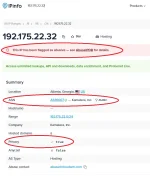
If you are going to use a VPN, and the ip address resolves to Datacamp, Fastly, Kamatera, and some others you're likely to have problems, especially if it's flagged as abusive.

You can check your IP address at ipinfo.io, and if you see results like this, it explains why you might have problems accessing the forum:

1781529975497.webp

Also, because of the way the custom 403 & 404 error pages work in Cloudflare, you may also see the same content unavailable notice if you click a link (or have a bookmark) to a deleted thread, like this: https://glp1forum.com/threads/hello-everyone.19232/
 

Trending Topics

Forum Statistics

Threads
17,934
Posts
186,648
Members
60,183
Newest
BlikWarrior
Back
Top Bottom