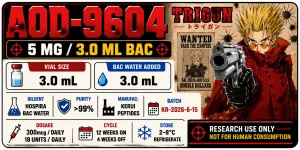
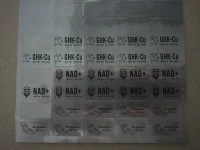
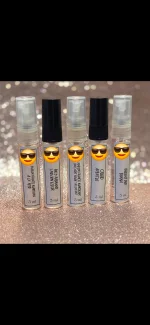
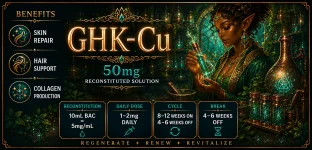
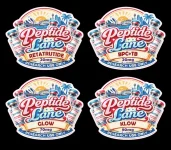
I used https://www.onlinelabels.com/ to order the sheets, and they let you use their label design software for free with purchase. So all I have to do is place the image and hit print.Do you know how I get the exact measurements for an A4 paper? Like if I want the label to be 20x15 mm.
Nice design! 👌I use the Liene PixCut S1 and create stickers to put on my Vials. Here is an example of one that I created recently.
View attachment 28711
I do pretty much the same I use Mr. Label or something similar (avery) and download the template into canva especially if my sheets are already precut. Ive also gotten the full sheets specifically for laser printers and used Canva to insert text & custom size my design and just copied and pasted to fill an A4 sized sheet. Ive found laser works better since I use glossy paper for my fragrance decanting glass bottles. Even did them for my own spice jars.I used https://www.onlinelabels.com/ to order the sheets, and they let you use their label design software for free with purchase. So all I have to do is place the image and hit print.


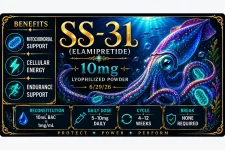
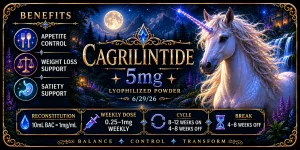
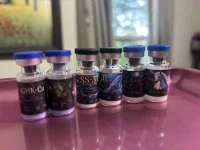
Totally agree mate, its easy to get carried away and over complicate a design, only to have it not reproduce well at the tiny print size.I’ve learned a few things about label design after my first trial run and wanted to share! I am printing using matte labels (Avery mailing labels for 10mL, 1”x1.75” from online labels.com for 3mL) & have an HP color laser printer & an Epson inkjet. Shown labels are my “Mythical creatures” collection for 3mL vials using my laser printer, which had much sharper results thank my inkjet.
My mistakes:
-Getting too intricate with the design: what looks great on screen may not translate to a teeny canvas
-Trying to fit too much text on the label. Labels are very small!
-Printing with a mostly dark colored background makes text harder to read
Although I still love these labels, think they’re beautiful even with my printer being streaky and see no need to change them, I need to use my magnifier app to read most of the text, and small text is blurry. I know what it says and have digital copies if I forget in a few years’ time. Next designs will be a lot different, and I’ll likely use either my much simpler graphic-based Canva designs or use much simpler Ai designs.
Digital:
View attachment 29555
View attachment 29556
View attachment 29557
Reality:
View attachment 29558

Those turned out FANTASTIC! And I love the shape!!Totally agree mate, its easy to get carried away and over complicate a design, only to have it not reproduce well at the tiny print size.
This recent custom order was about the limit.
Still turned out nice, but wouldn't go any smaller.
These are great. I have the same printer, would you mind sharing the code for these?I have the Niimbot D110 and now a B1. I picked some of my favorites from the Peppy Niimbot TG and edited them. There are nicer ones out there, but these are functional. I was able to do these without the VIP upgrade. My cycle time may vary from the label, but it's where I start.
Damn - when I saw your post ID-ing your printer, I thought FINALLY, a printer that prints colour labels... but then I saw the cost of the gear. Oh well, too pricy for my purposes. Anyway, your labels look great.I use the Liene PixCut S1 and create stickers to put on my Vials. Here is an example of one that I created recently.
View attachment 28711
These are really nice! May i ask which HP colour laser printer you have and what paper stock are you using? TIA.I’ve learned a few things about label design after my first trial run and wanted to share! I am printing using matte labels (Avery mailing labels for 10mL, 1”x1.75” from online labels.com for 3mL) & have an HP color laser printer & an Epson inkjet. Shown labels are my “Mythical creatures” collection for 3mL vials using my laser printer, which had much sharper results thank my inkjet.
My mistakes:
-Getting too intricate with the design: what looks great on screen may not translate to a teeny canvas
-Trying to fit too much text on the label. Labels are very small!
-Printing with a mostly dark colored background makes text harder to read
Although I still love these labels, think they’re beautiful even with my printer being streaky and see no need to change them, I need to use my magnifier app to read most of the text, and small text is blurry. I know what it says and have digital copies if I forget in a few years’ time. Next designs will be a lot different, and I’ll likely use either my much simpler graphic-based Canva designs or use much simpler Ai designs.
Digital:
View attachment 29555
View attachment 29556
View attachment 29557
Reality:
View attachment 29558
Phenomenal! I have been struggling to find out what kind of label printers employ different colour inks. Can you or anyone on this thread point me in the right direction? Many thanks.Started with peps a few years ago, and began printing labels for my own kits, and friends around me.
Helped make things easier to identify, organise, and helped prevent mix-ups (yep once mixed up lids when unboxing).
Plus, they’re an awesome way to add some personality to your stash.
What label designs are ya using? Share your favourites! Always interested in seeing creative new designs from the community. 🤙
10ml bac water??I’ve learned a few things about label design after my first trial run and wanted to share! I am printing using matte labels (Avery mailing labels for 10mL, 1”x1.75” from online labels.com for 3mL) & have an HP color laser printer & an Epson inkjet. Shown labels are my “Mythical creatures” collection for 3mL vials using my laser printer, which had much sharper results thank my inkjet.
My mistakes:
-Getting too intricate with the design: what looks great on screen may not translate to a teeny canvas
-Trying to fit too much text on the label. Labels are very small!
-Printing with a mostly dark colored background makes text harder to read
Although I still love these labels, think they’re beautiful even with my printer being streaky and see no need to change them, I need to use my magnifier app to read most of the text, and small text is blurry. I know what it says and have digital copies if I forget in a few years’ time. Next designs will be a lot different, and I’ll likely use either my much simpler graphic-based Canva designs or use much simpler Ai designs.
Digital:
View attachment 29555
View attachment 29556
View attachment 29557
Reality:
View attachment 29558
Thank you!! I have an HP Color LaserJet MFP M281cdw and got it from Costco several years ago; I’m sure there are new models now. The labels are from onlinelabels.com, item OL1067WX (1”x1.5”) I hear their glossy labels are great and really pop, but I chose matte because I wanted the flexibility to print on either laser or inkjet (glossy is inkjet only)These are really nice! May i ask which HP colour laser printer you have and what paper stock are you using? TIA.
No, for peptides I want to have very dilute reconstitutions of, like diluting with more than 3mL BAC. I’m doing this for peps that either have doses in mcg so that my unit doses aren’t teeny tiny (eg Ipamorelin) or for the spicy ones like GHK-Cu to try to mitigate discomfort.10ml bac water??
FYI, @DingoXL lists their print info on page 1 of this thread- they have a VERY nice professional print set up as that’s their business.Phenomenal! I have been struggling to find out what kind of label printers employ different colour inks. Can you or anyone on this thread point me in the right direction? Many thanks.
Totally missed that, thanks!There's a whole group for these in TG as @Chili777 mentioned above.
I know but your labels don’t make sense. You put a 10mg vial ss31 for a dose of 5-10MG then say you use 10ml bac water. That would be a 5ml dose for 5mg. That is FIVE normal syringes for a single dose. You need to proofread the mathNo, for peptides I want to have very dilute reconstitutions of, like diluting with more than 3mL BAC. I’m doing this for peps that either have doses in mcg so that my unit doses aren’t teeny tiny (eg Ipamorelin) or for the spicy ones like GHK-Cu to try to mitigate discomfort.