PayPal / USDT / Solana Crypto Guide 10.21.25

Guide: How to Buy and Pay with USDC (Solana Network)

What is this about?
• This guide shows you how to easily buy the stablecoin USDC, store it in your own
wallet, and use it for payments.
• ���� Made for beginners who want a fast, low-cost payment method without price
fluctuations.

Your Setup
• �� Coin: USDC
• � Network: Solana (SOL)
• ����� Exchange: Coinbase
• ������ Wallet: Exodus

Why this combination?
• �������� USDC = stablecoin
o BTC & ETH fluctuate → inconvenient for payments.
o USDC = stable, easy to buy with euros or dollars, and stays at $1.00.
• ��������� Solana as the network
o Lightning Fast: Transactions confirm in seconds.
o Ultra Cheap: Fees are typically less than $0.01 (compared to dollars on
Ethereum).
o Coins are network-bound: Make sure you use USDC-Solana.
• ����� Coinbase as exchange
o �� High liquidity and easy on-ramps for fiat currency.
o ��� Very simple interface for first-time buyers.

Key Terms
• �������� Stablecoin: A coin pegged to the USD.
• � USDC: A regulated stablecoin, backed 1:1 by dollar reserves.
• ��� Exchange: The marketplace (Coinbase) where you buy crypto with euros or US
dollars.
• ��� Wallet: Your own digital safe (Exodus) that you control completely.
• ��������� Solana: The high-speed blockchain that USDC is moving on.
• ���� Transaction Fee: The tiny fee paid to the network, paid in SOL.

Step-by-Step Guide
������ Step 1: Set up your Exodus Wallet
1. Download Exodus (iOS/Android).
2. Open the app → your wallet is created automatically.
3. ������ Write down your 12-word recovery phrase and store it safely offline.
��� Without the recovery phrase, your money is gone. Never share it with anyone.

Step 2: Deposit money to Coinbase
1. Create a Coinbase account and verify your ID.
2. Deposit euros (via iDEAL/SEPA) or US dollars (via Debit/ACH/Wire). Funds usually
arrive in minutes or a few business days depending on the method. (EDIT: Coinbase
has been HORRIBLE about holds lately, so once you deposit your cash you may
need to wait a few days before proceeding past the next step.)

Step 3: Buy USDC
1. Tap Buy crypto and choose USDC.
2. Enter the amount of euros or dollars you want to spend -> Review Order.
3. Tap Buy now. Your USDC will appear under My assets.

Step 4: Send USDC to Exodus
1. Open Exodus → Tap USDC → Tap Receive.
2. Crucial: Ensure the network selected is Solana. Copy your address (it will be a long
string of random letters and numbers).
3. In Coinbase → Tap Send crypto:
o Paste your Exodus address.
o Select USDC as the asset.
o Select Solana as the network (Always double-check this!).
o Check the gas fee.
o Tap Send now.
4. Your USDC will arrive in Exodus almost instantly.

Step 5: Buy SOL (for transaction fees)
• To send USDC out of your Exodus wallet later, you need a tiny bit of SOL to pay the
network fee.
• Buy a small amount of SOL (even $2–$5 is enough for hundreds of transactions) on
Coinbase and send it to your Exodus Solana address.

�� Done! Bob’s your Uncle!
You now have USDC + a little SOL in your own self-custody wallet—ready for safe, instant,
and independent payments.
I’ve set up Coinbase, my bank won’t let me use debit so I need to choose checking or savings.
I also set up both MetaMask and exodus. Exodus just opens into an account. I never got a recovery phrase and can’t find it in settings.
Will the Coinbase gas fee and exodus sol purchase come out of your usdt holding or do you need extra cash for that?
 
So now I’m lost because I can’t access web3, need a new tutorial lol
The functionality for swapping tokens (like PYUSD to USDC on Solana) is now integrated into the "Swap" feature rather than through a separate "Web3" section -- so use the "Swap" feature now.

I am still using a debit card on Paypal to buy PYUSD;
then I send it to Exodus wallet using Solana network; then use Jupiter to swap to USDC (Solana) (or whatever I will pay with).
You need enough SOL in your wallet to pay for transaction fees (also bought initially at Paypal using debit card).
Paypal doesn't put any holds on my money with the debit card from my bank.
 
The functionality for swapping tokens (like PYUSD to USDC on Solana) is now integrated into the "Swap" feature rather than through a separate "Web3" section -- so use the "Swap" feature now.

I am still using a debit card on Paypal to buy PYUSD;
then I send it to Exodus wallet using Solana network; then use Jupiter to swap to USDC (Solana) (or whatever I will pay with).
You need enough SOL in your wallet to pay for transaction fees (also bought initially at Paypal using debit card).
Paypal doesn't put any holds on my money with the debit card from my bank.
Thank you for your help
 
The functionality for swapping tokens (like PYUSD to USDC on Solana) is now integrated into the "Swap" feature rather than through a separate "Web3" section -- so use the "Swap" feature now.

I am still using a debit card on Paypal to buy PYUSD;
then I send it to Exodus wallet using Solana network; then use Jupiter to swap to USDC (Solana) (or whatever I will pay with).
You need enough SOL in your wallet to pay for transaction fees (also bought initially at Paypal using debit card).
Paypal doesn't put any holds on my money with the debit card from my bank.
I haven't updated Exodus recently, and there has been a Swap function for a while, but when I looked at swapping within Exodus (rather than Web3), I got higher fees.

It wasn't much on Solana ( $0.05 which is an improvement), but still 10x what it was on Jupiter. For ERC-20/Eth it was still the $5 I remembered, which is about 100x what it looks like through Wormhole. For Solana, I wouldn't bother with Web3, but for Eth I might.
 
Back in the day (a little over a year ago), people were spending $10-$30+ to buy crypto to pay for their peptides. In my infinite cheapness, I sought a different, i.e. cheaper way to do it.

That's when I discovered that you can use PayPal to buy crypto, specifically USDT/USDC on Solana, for no fee. However, since putting this together, PayPal has instituted a 1.5% fee when buying through Exodus Wallet. It's a minimal fee and not bad if you value the convenience.

This crypto purchase method allows you to purchase stable coins, which are pegged to the US Dollar, and convert to other stable coins on the Solana chain, which completely avoids market volatility. You can't profit with these coins, but you can't really lose value either.

You may have seen a version of this elsewhere, but this in the most updated version.

Please let me know if you have any questions! I've been answering them for over a year so I'm sure I've heard it before and probably have an answer!
Thanks for putting this in the ether; I have been looking at a simple way to do this, and this fill my need perfectly.
 
Thanks for putting this in the ether; I have been looking at a simple way to do this, and this fill my need perfectly.
Buying PYUSD and Solana on PP is a good choice and no-fee. Same with Coinbase and USDC. These are the KYC entry points for crypto and make sure you actually check what amount you can transfer before you make a buy since it CAN take 5-7 days to clear (also note that PP has a bug on mobile that will sometimes throw and error- don't try twice use the html website instead). Once you transfer it to the custodial wallet, Exodus, you can move between whatever is required. You can use the swap functions built into Exodus and their "preferred partners" (just like you can use Moonpay to buy directly), but they are preferred, because they kickback some of their fees!

If you swipe down and checkout the Web3 part of Exodus, you can use Jupiter and Wormhole without location blocks or significant fees (eg <$0.01 per transaction in 5-10 seconds on Sol, but longer on ERC-20 Eth).
 
Buying PYUSD and Solana on PP is a good choice and no-fee. Same with Coinbase and USDC. These are the KYC entry points for crypto and make sure you actually check what amount you can transfer before you make a buy since it CAN take 5-7 days to clear (also note that PP has a bug on mobile that will sometimes throw and error- don't try twice use the html website instead). Once you transfer it to the custodial wallet, Exodus, you can move between whatever is required. You can use the swap functions built into Exodus and their "preferred partners" (just like you can use Moonpay to buy directly), but they are preferred, because they kickback some of their fees!

If you swipe down and checkout the Web3 part of Exodus, you can use Jupiter and Wormhole without location blocks or significant fees (eg <$0.01 per transaction in 5-10 seconds on Sol, but longer on ERC-20 Eth).
Once again this is why I signed up for this forum. The wealth of knowledge from the community blows my mind. Finding a reputable vender and navigating payments are easily the hardest things I noted when jumping into this space. The more I read from the forums, the better informed I feel before making a decision. Thanks from a rookie trying to get educated!!
 
The functionality for swapping tokens (like PYUSD to USDC on Solana) is now integrated into the "Swap" feature rather than through a separate "Web3" section -- so use the "Swap" feature now.

I am still using a debit card on Paypal to buy PYUSD;
then I send it to Exodus wallet using Solana network; then use Jupiter to swap to USDC (Solana) (or whatever I will pay with).
You need enough SOL in your wallet to pay for transaction fees (also bought initially at Paypal using debit card).
Paypal doesn't put any holds on my money with the debit card from my bank.
if I'm understanding this correctly, we can ignore most of the steps in the original guide now?
and now the steps are:
1. buy PYUSD (with debit card) on PayPal (make sure your account is verified for this)
2. send PYUSD (on Solana network) to Exodus wallet
3. use Jupiter (a Solana exchange) to swap to USDC-Sol (or another crypto of choice.)

But I'm confused on how you "use Jupiter to swap." I send the PYUSD to exodus, so then do I swap it to JUP then to USDC? why don't I just swap PYUSD to USDC? unless I'm misunderstanding.
 
if I'm understanding this correctly, we can ignore most of the steps in the original guide now?
and now the steps are:
1. buy PYUSD (with debit card) on PayPal (make sure your account is verified for this)
2. send PYUSD (on Solana network) to Exodus wallet
3. use Jupiter (a Solana exchange) to swap to USDC-Sol (or another crypto of choice.)

But I'm confused on how you "use Jupiter to swap." I send the PYUSD to exodus, so then do I swap it to JUP then to USDC? why don't I just swap PYUSD to USDC? unless I'm misunderstanding.
You need a little bit of Solana to do the transfer (at least to get it out of Exodus, PayPal may allow the transfer free). But you can buy $2 of Sol on PayPal at the same time as you're getting PYUSD (conveniently they even have the same wallet address). Then transfer $1 so you have "gas fees" in Sol in both places.

I have used Jupiter previously for PYUSD>USDC conversions on the Sol chain, because fees were a few % on the in app Exodus swap. Last I checked though, it was only $0.05 to convert $100, which is more convenient that dealing with Jupiter. However, I've also used Wormhole (another Web3) to transfer USDC/sol to USDC/eth on the ERC-20 chain for pennies.... but the builtin swap UI (last week?) was $5 for $100, which is high enough that I'll use Web3!

So the good news is that it looks like now you can go super easy (once you have a bit of Solana in Exodus) for conversions on the Sol chain, but I'd still recommend getting comfortable with the Web3 tools, cuz you never know when they'll jack up fees again.
 
I have used Jupiter previously for PYUSD>USDC conversions on the Sol chain, because fees were a few % on the in app Exodus swap. Last I checked though, it was only $0.05 to convert $100, which is more convenient that dealing with Jupiter. However, I've also used Wormhole (another Web3) to transfer USDC/sol to USDC/eth on the ERC-20 chain for pennies.... but the builtin swap UI (last week?) was $5 for $100, which is high enough that I'll use Web3!
Oh, so you're not using Jupiter to swap at all sometimes? So it's:

1. Buy PYUSD plus a little SOL/ETH (for gas) on Paypal
2. send PYUSD to your wallet (Exodus, Base, etc)
3. Swap/exchange to USDC using the cheapest method (Could be Exodus, could be Jupiter)

Is this right?
 
This is my first transaction, and although I haven't sent it yet I have it all set up. My account was set up after they turned off web3 so that's not even an option for me. I did pretty much what you think is right. Bought PYUSD and some SOL from Paypal (bought way too much Sol, like $20 lol didn't know it was less than 0.01 per transaction), transferred it over to Exodus, then used the swap functionality in the app. I swapped 334 PYUSD to 330.83 USDC.
 
This is my first transaction, and although I haven't sent it yet I have it all set up. My account was set up after they turned off web3 so that's not even an option for me. I did pretty much what you think is right. Bought PYUSD and some SOL from Paypal (bought way too much Sol, like $20 lol didn't know it was less than 0.01 per transaction), transferred it over to Exodus, then used the swap functionality in the app. I swapped 334 PYUSD to 330.83 USDC.
Oh, Daaaaamn!!!! They got rid of Web3?
I can't see it since I have an old version.
I guess the fees are how they make all their money!

Well, that sucks. At least the fees are reasonable for swapping on /sol.
Some folks like to use /eth chain, which would be more expensive.

Oh, and if you really have toooo much Solana, you can swap it for PYUSD or USDC (obviously on /sol) as well.
 
Oh, Daaaaamn!!!! They got rid of Web3?
I can't see it since I have an old version.
I guess the fees are how they make all their money!

Well, that sucks. At least the fees are reasonable for swapping on /sol.
Some folks like to use /eth chain, which would be more expensive.

Oh, and if you really have toooo much Solana, you can swap it for PYUSD or USDC (obviously on /sol) as well.

Thanks, yea I did figure that part out. Ended up taking a little of what I had left, swapped again and added vendor bac water to my order. What's the worst that could happen? I'm gonna leave before the Hospira people find this post.
 
Oh, Daaaaamn!!!! They got rid of Web3?
I can't see it since I have an old version.
I guess the fees are how they make all their money!
Though I have the web3 version I'm migrating to Trust Wallet.
From @brownguy89 on STG's Crypto channel:
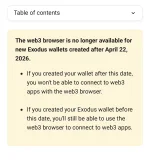
No more web3 for new wallets in exodus.
Will make swaps cost more
1) trust wallet supports gasless sending for stablecoin on eth/ solana
2) gasless swaps for stablecoin on eth/sol and web3 swaps
 
They got rid of Web3?
Not exactly. For wallets created before April 22, 2024 it seems unchanged. Possibly for all desktop approaches also, but they're considered more of a security risk, I'm told.

For newer wallets on mobile, they've created a complicated arrangement (for security and compliance) which involves an external web3 thing ("DeFi dApp") and a digital handshake between that and Exodus Wallet. It's too complicated for me to get my head around at the moment, especially because the web3 apps want to be your wallet too. Jupiter Mobile might (or might not) be the one.
 
Last edited:
I added PYUSD to my Assets but can’t find it when buying Cryptos like in the tutorial, just not available and when I try to buy it directly from the wallet side, it brings me over to buy and still says on BTC
 

Trending Topics

Forum Statistics

Threads
17,773
Posts
184,682
Members
59,696
Newest
Federic1
Back
Top Bottom